Free Weltrade PainX 400 Grid Trading EA – Antispike Synthetics Robot
In today’s competitive world of automated synthetics trading EAs, traders are constantly searching for tools that combine precision, adaptability and smart risk control. This grid trading painx 400 robot stands out by taking a strategic momentum based approach amplifying winning positions while minimizing exposure during unfavorable market moves, it’s designed for traders who value calculated scaling methods and want to harness volatility with a disciplined automated edge.
Important Disclaimer
⚡ Trading Risk: Trading forex and synthetic indices involves substantial risk. Past performance does not guarantee future results.
📋 Not Financial Advice: The PainX Free EA is for educational purposes only. This is not financial advice. Always consult with a licensed financial advisor before making investment decisions.
✅ Demo Testing Required: This EA is completely free. You must test on a demo account first before using real money.
🚫 No Guarantees: No guarantees of profitability. Market conditions can change, and losses may occur.

How to Load the Painx Grid EA
- Download the EA file (
.ex5) from this page. - Open MetaTrader 5 and click File → Open Data Folder.
- Navigate to
MQL5 → Expertsand paste the EA file inside. - Restart MetaTrader 5 so the EA appears in the Navigator → Expert Advisors list.
- You may also right click next to expect advisors and refresh the ea should appear after refreshing.
- Drag and drop the EA onto the PainX 400 chart (M1 timeframe).
- Allow DDL imports ,navigates to inputs and set your preferred grid settings and press OK.
- Enable Algo Trading and the ea should trade for you.
- It may take up to at least 40minutes before its first trade.
- make sure you have a blue cap at the top right hand corner after the name of the ea.
- learn more about how to load EAs click here.
Backtest the Weltrade Pain X 400 Grid Antispike EA
Verify performance with your own data and settings.
Download the Backtest build and run it in MT5 Strategy Tester on Pain X 400 (Weltrade). Use the M1 timeframe with Every tick based on real ticks (preferred) or 1-minute OHLC. This EA targets antispikes with short TPs, so fresh M1 data provides the most realistic picture.
- Symbol: PainX 400 (Weltrade)
- Timeframe: M1
- Model: Every tick based on real ticks (best) or 1-minute OHLC
- Risk tip: start with Number of Trades = 1 for smaller balances
Or click here to download directly.
Educational use only. Past performance does not guarantee future results. Test on demo first.
Watch our previous EA post to see a video demo of backtesting.
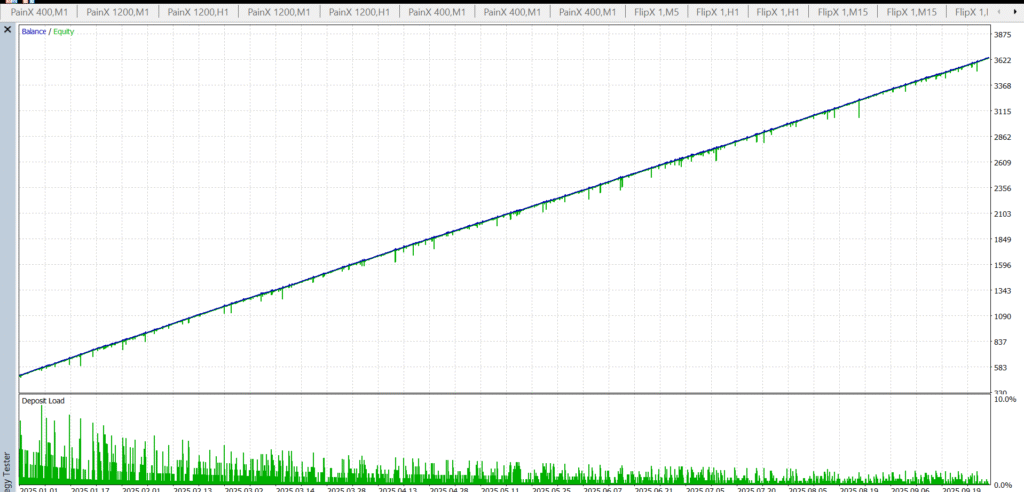
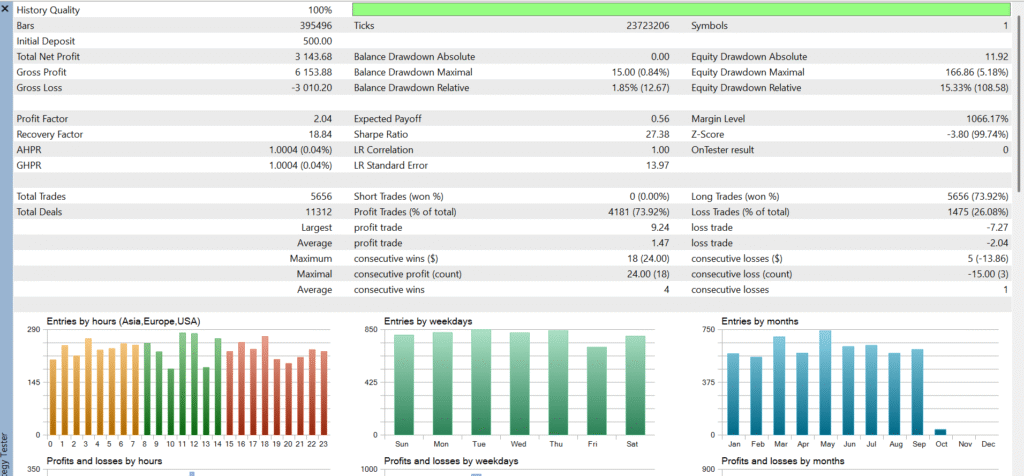
below pictures shows a back test on minute one time frame on a 500$ account from the first of January 2025 to the 3rd of October 2025 this is with original settings that comes with the ea
The Core Approach – GRID Trading
This weltrade painx 400 grid trading robot uses a smart grid based strategy designed specifically for antispike trading on synthetic indices, instead of it relying on stop losses it focuses entirely on buying during sharp downward spikes this, occurs frequently in volatile Weltrade synthetic markets. The EA begins by opening a buy trade with a small take profit aiming to catch quick rebounds for fast scalps.
If price continues to fall the ea automatically places pending buy limit orders building a structured grid beneath the current price, as the market retraces these grid entries work together to recover drawdown and close all trades at breakeven or slight profit. By removing stop losses and leveraging grid positioning.
The EA turns sudden price spikes into controlled profit opportunities making it ideal for Weltrade traders who want to capitalize on PainX 400 antispikes, short TP grid setups and high volatility conditions.
Key Features of the Weltrade PainX 400 Grid Antispike EA
- Set and forget automation
Fully automated execution with optional auto lot sizing built for traders who prefer minimal manual intervention. - Buy only antispike logic (PainX 400)
Targets sharp downward spikes on Weltrade’s PainX 400 and opens buy positions to capture the corrective rebound. - Short TP scalping
Uses small predefined take profits to lock quick gains from fast antispike recoveries. - Grid with pending buy limits (no stop loss)
Automatically places buy limit orders beneath price to build a controlled grid when the market dips no top loss ,the grid structure is used for recovery. - Basket breakeven engine
As price retraces, positions work together to close the basket at breakeven or a slight net profit aiming to neutralize drawdown. - Weltrade optimized routing
Tuned for Weltrade synthetic conditions and designed to align with antispike behavior on PainX 400. - Minimum capital guidance
Works best with $500+ as a practical starting point for grid depth and step spacing on PainX 400. - Configurable risk posture
Key controls include grid step , initial lot and auto lot multiplier and basket exit logic allowing you to tune aggressiveness to market conditions.
Note: While the EA removes stop losses by design, careful configuration of grid step, max orders, and equity protections is essential to match volatility and reduce persistent drawdown risk.
Resilient by Design
The Weltrade PainX 400 Grid Antispike EA is built with stability and robustness in mind. Unlike many automated systems that can be thrown off by network interruptions or broker execution quirks, this EA’s structure is inherently resistant to issues like slippage, requotes, latency or brief disconnections. Whether you’re running it on a VPS or switching between broker accounts, the design ensures continuous operation even in less than ideal trading conditions.
Because the EA doesn’t rely on stop losses and instead uses a pending buy limit grid, it can often withstand sudden spikes, flash crashes and deep pullbacks positioning itself to recover when price retraces. This resilience makes it particularly well suited to volatile synthetic indices like PainX 400 on Weltrade where sharp price movements are common.
👉 Important: Always start by testing the EA on a demo account for at least two weeks. Make sure you fully understand how the grid structure and basket closing logic operate before running it on a live account.
Recommendations
To get the best performance out of the Weltrade PainX 400 Grid Antispike EA, consider the following setup and usage guidelines:
- Start on a demo account
Run the EA in a demo environment for at least two weeks to understand its behavior, grid structure, and basket closing logic before going live. - Use a VPS for stability
A reliable VPS with low latency to the Weltrade server helps maintain consistent execution, especially during volatile periods. - Recommended starting balance: $500+
This balance gives the grid enough room to build positions and handle deeper antispikes without overexposure. - Use only on PainX 400 (Buy only)
The EA is specifically designed for PainX 400 synthetic index on Weltrade, trading only buy positions during antispike conditions. - Default settings work well, but adjust grid step carefully
Tuning the grid step and depth can make the difference between smooth recovery and excessive drawdown. Avoid making it too tight in highly volatile conditions. - Run during active market sessions
PainX 400 tends to show more reliable antispike behavior during liquid, high volume periods. Avoid running it in very quiet sessions with thin price action. - Limit the number of active EAs per account
Running too many grid strategies simultaneously can lead to overlapping exposure. Keep setups organized with unique magic numbers. - Monitor equity and set safety levels
Even though the EA is built to recover via grid, use equity protection or manual intervention if drawdown exceeds your comfort zone. - Do not use stop losses
The strategy relies on grid recovery, not fixed SL exits. Adding external stop losses can disrupt its internal logic. - Avoid manual interference
Closing grid trades individually or modifying orders manually can break the basket logic. Let the EA manage positions from entry to closure.
Conclusion
This EA is built for traders who value structure, automation and adaptability. With proper setup and risk control, it can be a reliable tool for navigating volatile synthetic markets on Weltrade. Always test first then deploy with discipline.

Sponsored • Partner Offer
Join Our Telegram Community
Get updates, trade signals, and connect with other traders
Join Telegram Group →