Arrow Pulse Indicator – Ultimate Trading Tool for Forex and Synthetic Indices
The Arrow Pulse Indicator is a powerful MT5 trading tool that delivers clear arrow signals and line-based buy and sell levels for both Forex and Synthetic Indices. It combines precision and simplicity, making it ideal for scalping or swing strategies across different market conditions. The indicator works on all major brokers, but it performs best on Weltrade and Deriv Synthetic Indices, where its signals are more consistent and highly responsive to market volatility.
The Arrow Pulse Indicator is completely free to download and compatible with all major MT5 brokers, including RoboForex, Exness, Deriv, and Weltrade. Designed for both Forex and Synthetic Indices, it delivers precise arrow signals and dynamic buy/sell levels that adapt to market volatility in real time. While it performs smoothly on all supported brokers, the indicator shows its strongest accuracy and responsiveness on Deriv and Weltrade Synthetic Indices, where market movements are faster and more technical. Whether you’re a scalper or swing trader, the Arrow Pulse Indicator helps you identify cleaner entries, confirm momentum shifts, and trade with more confidence across multiple conditions
Trading Groups & Chart Files:
Telegram: @forexsynthetics_backup
Download your chart templates and start trading today with Deriv and Weltrade Synthetics.
Why the Arrow Pulse Indicator Is One of the Best
The Arrow Pulse Indicator gives you everything on-chart: sell lines and buy lines with clearly marked stop-loss and target levels. It’s built for clarity and speed, making it perfect for newbies and efficient for pros — whether you scalp or swing. It works on all major MT5 brokers, and shines on Deriv and Weltrade Synthetics thanks to consistent, high-quality signals in fast markets. For Forex pairs, trade it with a trusted broker like FBS for tight execution and reliable fills.
Register with FBS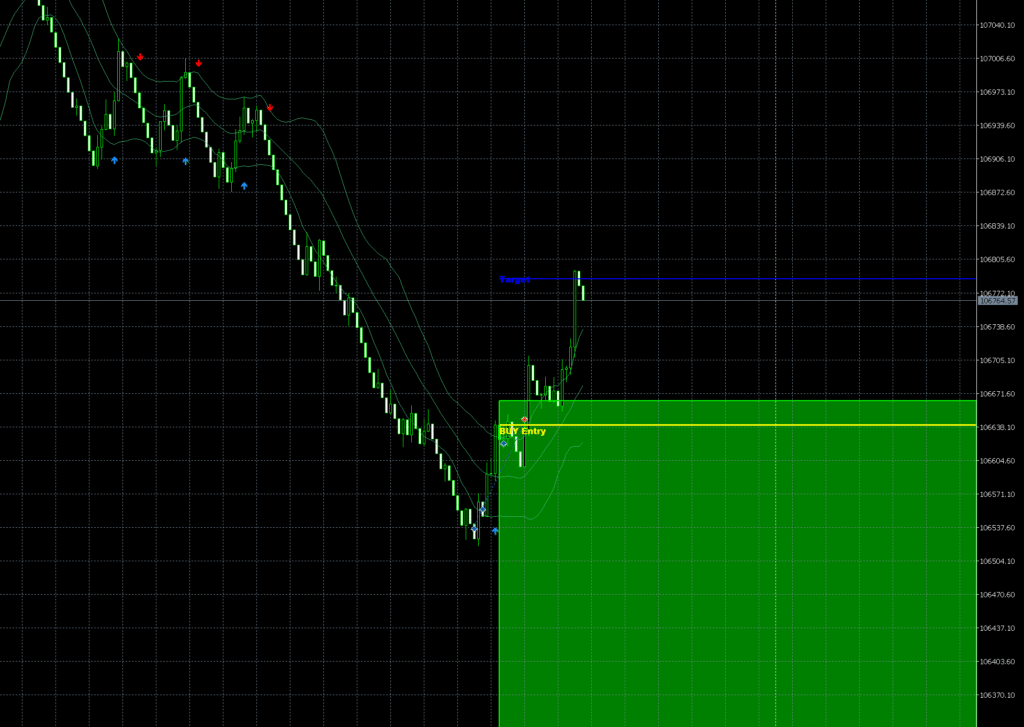
Want the ArrowPulse Indicator source code?
Text me directly on Telegram — Price: $100.
Risk Disclaimer
Trading forex and synthetic indices involves substantial risk and is not suitable for everyone. Past performance does not guarantee future results. This is not financial advice.
The ArrowPulse EA is provided for educational purposes only. Always test on demo accounts before going live. Only trade with funds you can afford to lose.
Learn MoreIndicator Overview
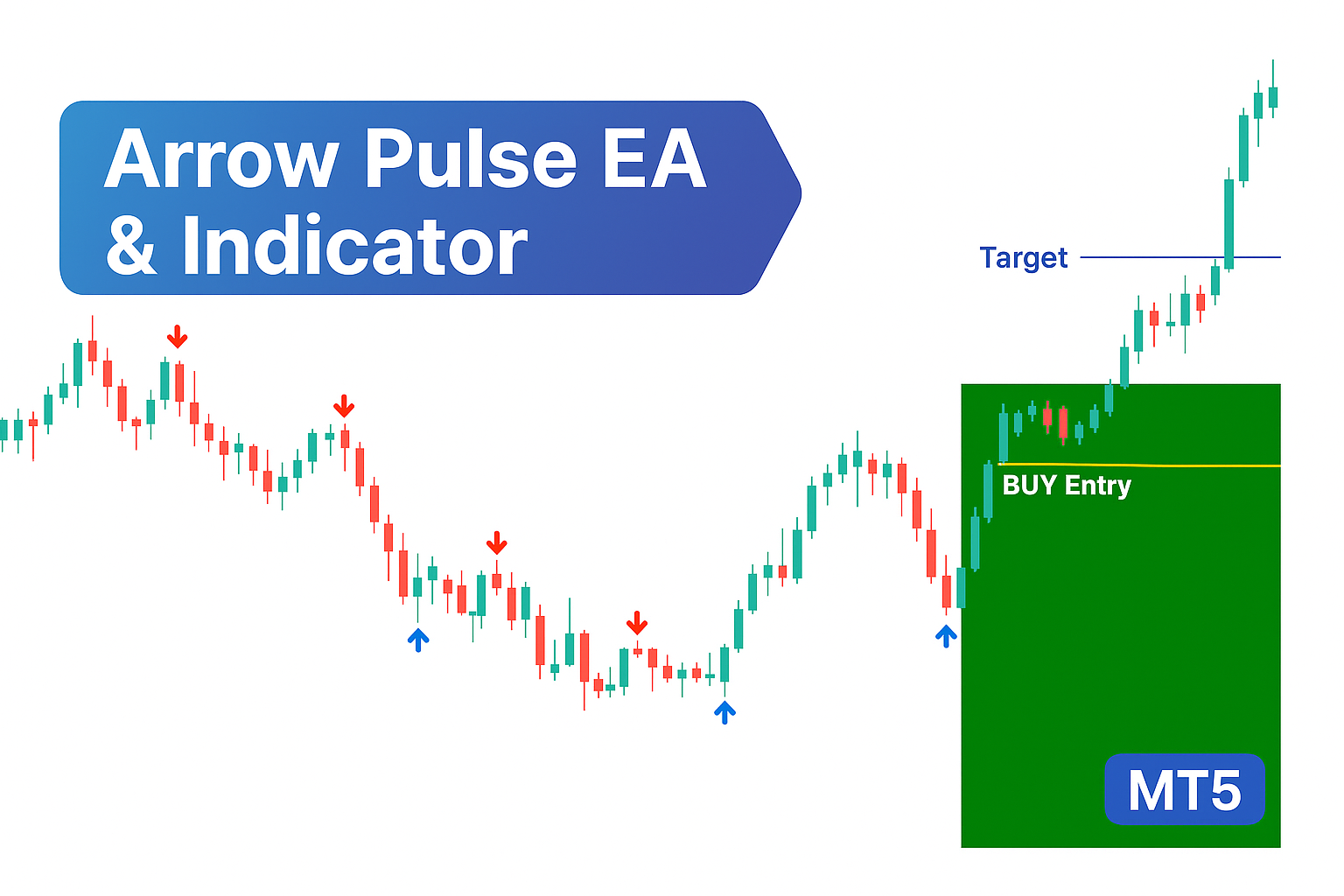
The arrow pulse indicator is created to provide clear and accurate entry and exit zones, It plots blue arrows at swing lows for buy signals and red arrows at swing highs for sell signals, a yellow confirmation line marks the entry zone and a blue line indicates the target level with a green box highlighting the buy area.
By using a layered filtering system, the indicator focuses on stronger setups to avoid low quality signals, this helps traders identify high probability reversal points with clear guidance for both entries and exits.
The ArrowPulse Indicator Works only on Laptop or Desktop
Our ArrowPulse Indicator is designed for full MT5 performance and accuracy, which is best achieved on a laptop or desktop computer. These devices allow the indicator to process data faster, display full chart structures, and render buy/sell lines, stop-loss, and target levels clearly without lag.
A larger screen also helps traders analyze multiple timeframes and signals at once, while desktop MT5 terminals offer more stable connections, real-time updates, and access to advanced charting tools — ensuring smoother and more reliable results.
How to Install the Arrow Pulse Indicator
- Go to File → Open Data Folder in MT5 again.
- Open the MQL5 → Indicators folder.
- Paste the indicator file inside the Indicators folder.
- Restart MT5 or refresh the Navigator panel.
- The indicator will appear under Indicators in the Navigator.
- Drag and drop it onto any chart, allow DLL imports and press OK. It will display signals sametime
New to MT5?
If you’re new to MetaTrader 5 and want to learn how to install or load custom indicators, here are some helpful guides and tutorials:
- Official MetaTrader 5 Help — Technical Indicators
- Blackwell Global — How to Install Custom Indicators on MT5
- FBS Academy — How to Use Indicators in MT5 (Video Guide)
- YouTube — Install Indicators on MT5 (Step-by-Step Video)
These sources will show you exactly how to copy your .ex5 or .mq5 files into the MT5 folder, refresh the terminal, and load your indicators successfully.
How to Remove the Arrow Pulse Indicator
🧭 Option 1: Remove from the chart
- Right-click anywhere on the chart where the indicator is applied.
- Choose Indicators List from the menu.
- In the list, select the indicator you want to remove.
- Click Delete → then click Close.
✅ The indicator will be removed from that chart immediately.
🧰 Option 2: Delete from the Navigator panel
- Press Ctrl + N to open the Navigator panel in MT5.
- Expand the Indicators section.
- Right-click on the indicator you want to remove.
- Select Delete.
- Confirm to permanently remove it from the platform.
🗂 Option 3: Manually delete the file
- In MT5, go to File → Open Data Folder.
- Open MQL5 → Indicators.
- Locate the indicator file (with a
.ex5extension) and delete it. - Restart MT5 so the indicator is fully removed from the Navigator list.
Indicator Buy Signals
The image below shows the 5 minute chart of Gold (XAUUSD). The Arrow Pulse Indicator has identified key swing low at points 1 and 2 , which often serve as the foundation for upcoming bullish moves and marked these areas with blue arrows as buy signals.
When these signals appear, traders should look for entry opportunities by watching the yellow confirmation line labeled “Buy Entry.” Before taking any trade, it’s important to confirm that a blue arrow and a buy entry signal are present and then check for alignment across multiple time frames. The strongest setups occur when buy arrows and buy signals are visible on the 5-minute, 15-minute, and 30-minute charts simultaneously
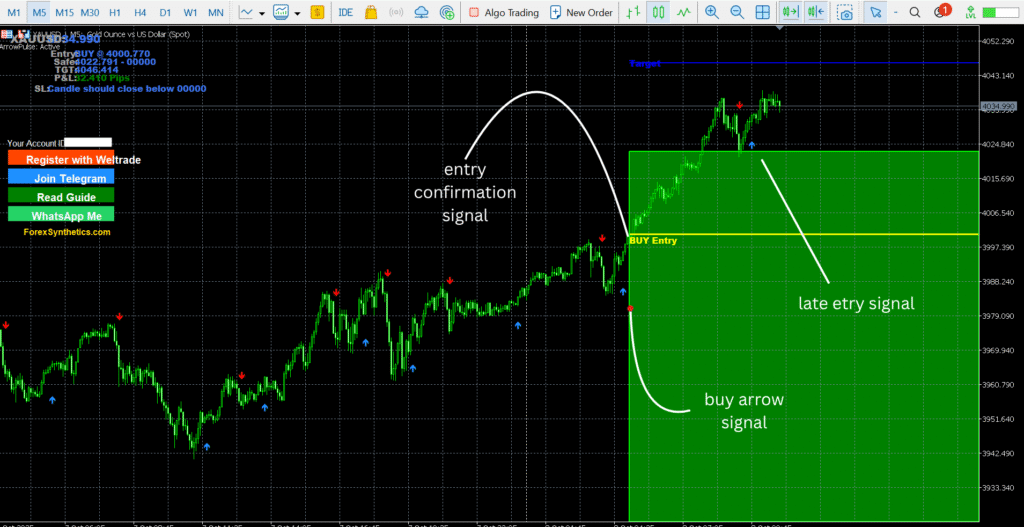
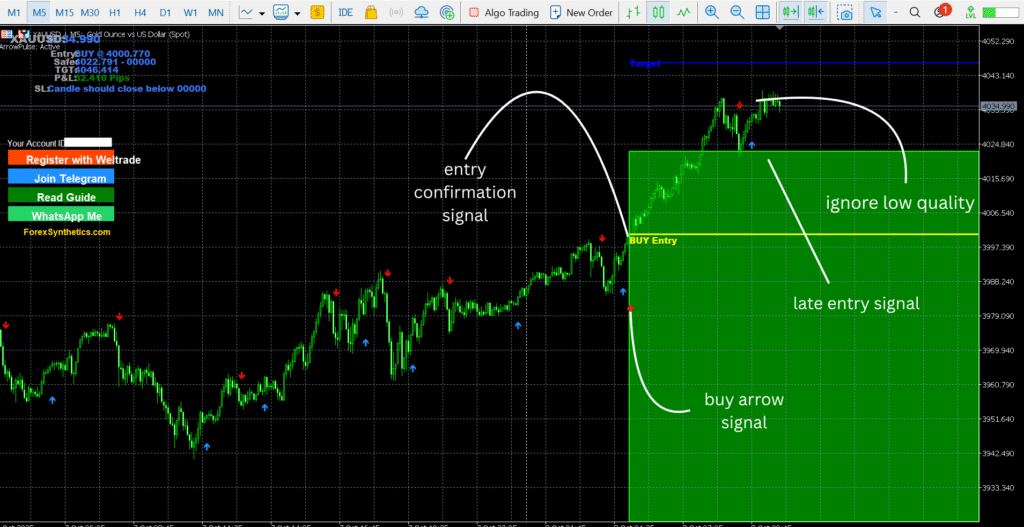
The arrows displayed on the chart are excellent for identifying potential trade entries, but to improve accuracy, they should always be confirmed with the signal line. To use this strategy effectively, only take trades when both the arrow and the signal line align. Enter when a blue arrow appears together with a buy signal on the yellow line and only trade the signal line when it confirms with the arrows.
This approach significantly enhances precision by filtering out low quality setups. The indicator becomes even more powerful when combined with multiple time frame confirmations. The images below illustrate a strong buy signal confirmed across different time frames.
M5 Time Frame Buy Setup
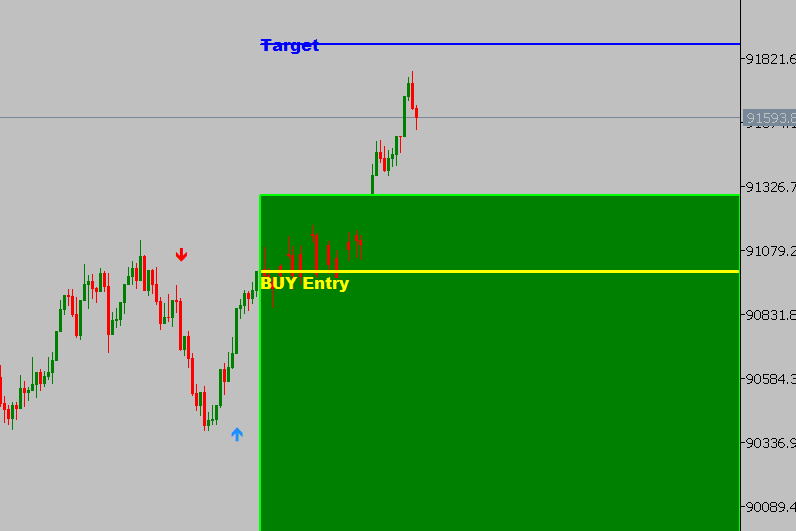
The image above shows a buy arrow and a buy signal on the 5-minute chart. Once you spot this setup, switch to higher time frames to confirm the direction and strength of the move. This first step helps you identify the initial signal and prepare for stronger confirmations.
M15 Time Frame Buy Setup
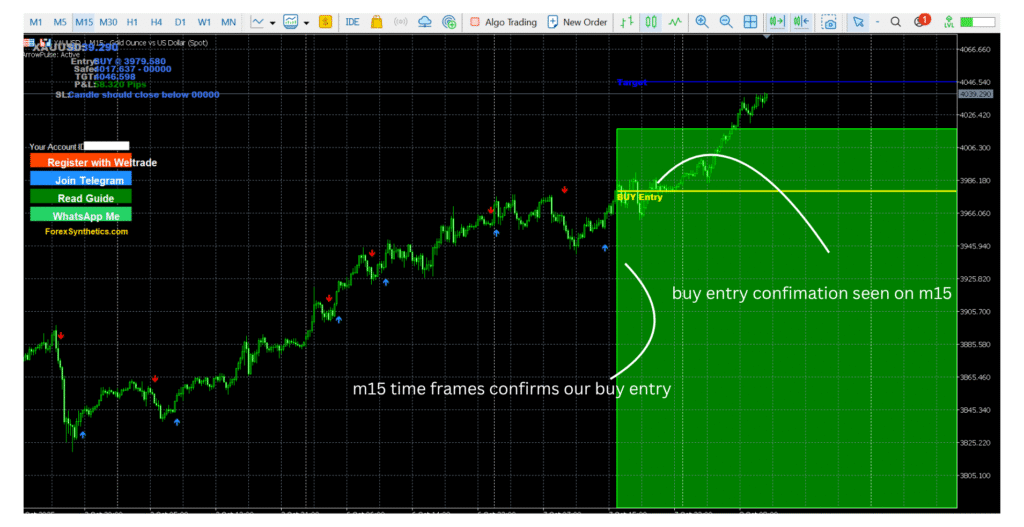
The second image shows the 15-minute chart. Here, look for the same buy arrow and buy signal combination to align with the initial M5 setup. When both the 5 minute and 15 minute charts confirm the same direction, the signal gains more strength and reduces the chance of low quality entries.
M30 Time Frame Buy Setup
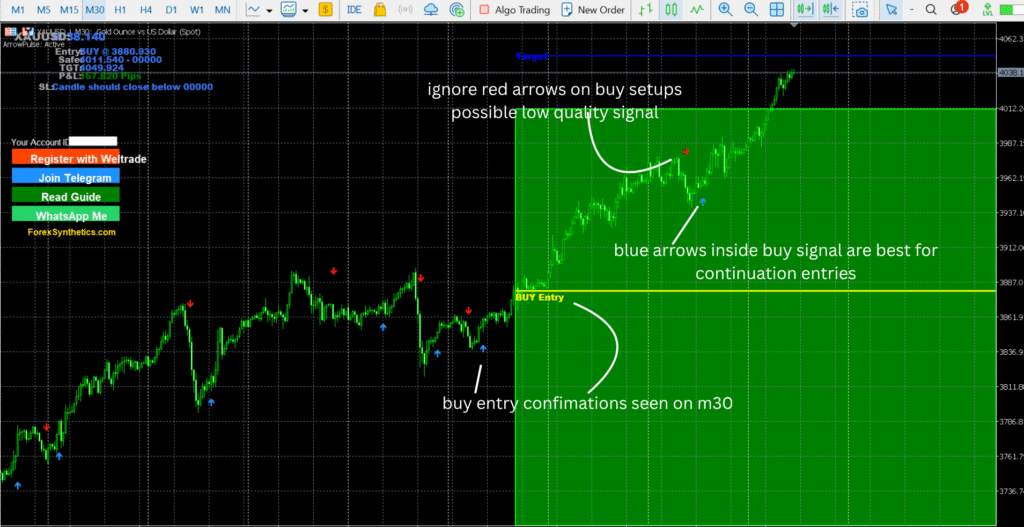
The third image shows the 30-minute chart. This final confirmation step gives you a broader view of market structure and trend direction. When the buy arrow and buy signal appear on M30 in alignment with M5 and M15, it indicates a strong continuation setup. This layered confirmation process helps filter out weak setups and improves the accuracy of your entries. Once all higher time frames are aligned, you can then move down to the 1-minute chart, wait for a fresh blue arrow, and execute a precise sniper entry.
Indicator Sell Signals
The image below shows the 15-minute chart of FX Vol 20 on Weltrade Synthetic Indices. The Arrow Pulse Indicator has identified key swing highs at points 1 and 2, which often act as the starting points for bearish moves, and marked these areas with red arrows as sell signals.
When these signals appear, traders should focus on the yellow confirmation line labeled “Sell Entry.” Before taking any trade, make sure that both the red arrow and the sell entry signal are present, then move to other time frames for additional confirmation. The highest-quality setups occur when sell arrows and sell signals align across the 15-minute, 30-minute, and 5-minute charts, indicating a strong continuation to the downside.
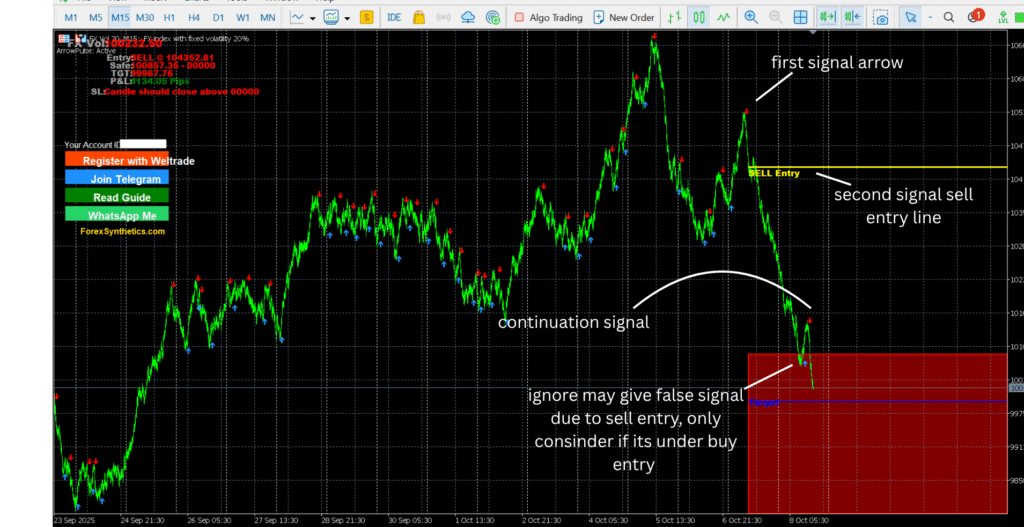
This method greatly improves trade accuracy by focusing on high-probability bearish signals and eliminating weak setups. The true strength of the indicator is revealed when it’s used together with multiple time frame analysis. The images below demonstrate a clear sell signal that aligns perfectly across several time frames, highlighting a strong continuation to the downside
Minute 5 time Frame Sell Setup
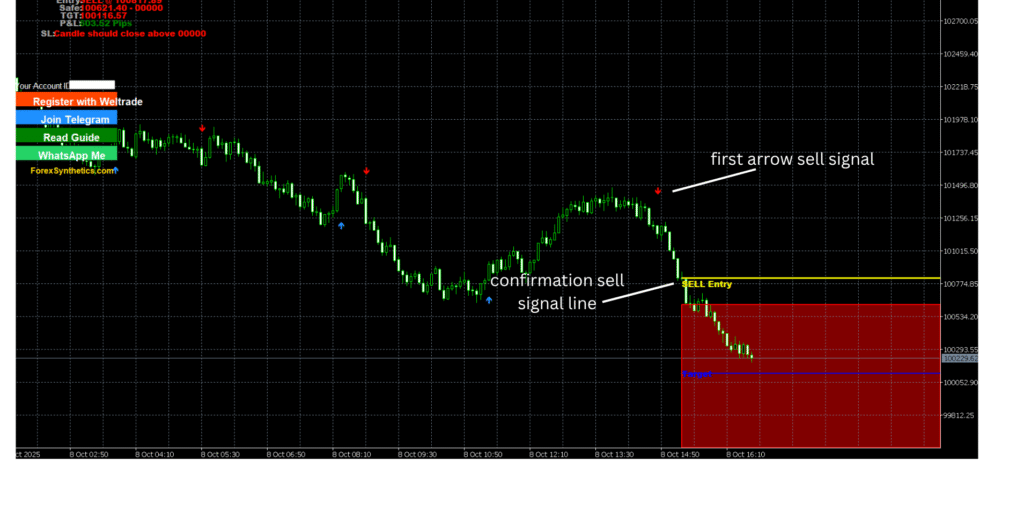
The image above provides a clear example of how to use the indicator to take a sell trade. The first step is to look for a downward red arrow, followed by checking the signal line for confirmation. Once both align, prepare for a potential sell entry. Before entering, always verify the setup across other time frames, as there are instances where the 5 minute chart may show a sell signal while the 15 minute chart indicates a buy signal, a common sign of a ranging market.
The most reliable signals occur when the chart is clean and not cluttered with multiple buy and sell arrows close together. Avoid entries in such choppy conditions and instead wait for the market to break out of that range. Then base your entry on the signal line in combination with the most recent arrow
As shown below, both the M15 and M30 time frames confirmed this sell setup, adding extra strength to the signal.
Minute 15 time Frame Sell Setup
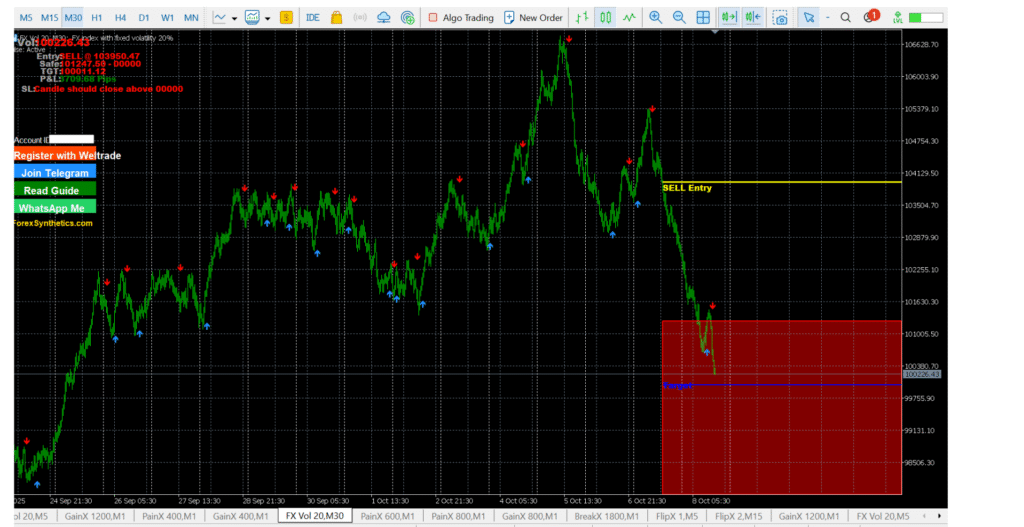
Looking at the image above, you can see that the sell entry formed after the red arrow appeared and the signal line confirmed the setup. The confirmation started on the M15 chart (first image in the sells section), followed by the M5 and then the M30 time frames. Even the 1-hour chart aligned with the signal, making this a clean and well-structured sell setup supported across multiple time frames.
Editors review
The Arrow Pulse Indicator is a well-structured trading tool designed for traders who value clarity, precision, and flexibility. Built for MetaTrader 5 (MT5), it combines two key components: the HalfTrend system (arrows) for spotting potential market turning points and the RadarSignal line (yellow confirmation line) for validating entries. Together, they create a layered approach that filters out low-quality setups and improves overall signal accuracy.
What makes it stand out is its clean interface and simple configuration. The indicator clearly displays buy and sell arrows along with confirmation levels, allowing traders to see setups at a glance without unnecessary complexity. Both beginners and experienced traders can easily interpret the signals and apply them to their preferred strategy — whether scalping or swing trading.
In terms of performance, the indicator works best when used with multi-timeframe confirmations, particularly on M5, M15, and M30 charts. The combination of arrow and signal line validation helps traders avoid random entries and focus only on high-probability setups.
Overall, the Arrow Pulse Indicator offers a perfect balance of simplicity and accuracy, making it an excellent addition to any trader’s technical toolkit — especially for those trading Forex and Synthetic Indices.
How To Best use
The Arrow Pulse Indicator operates as a fully visual analytical tool on MetaTrader 5 (MT5). Unlike an Expert Advisor, it does not execute trades automatically — instead, it provides precise, real-time trading signals that help you identify high-probability market entries with clarity and confidence.
The indicator integrates two main systems: the HalfTrend arrows, which highlight potential market reversals, and the RadarSignal line, a yellow confirmation line that helps validate trend direction and filter out false signals. Both systems can be interpreted together or independently, giving traders flexibility to focus on either faster arrow entries or more conservative, confirmed signals.
Once the indicator is applied to a chart, it continuously updates to reflect changing market conditions, displaying buy and sell signals, trend confirmations, and target zones in real time. Traders can adjust its parameters to match their personal strategy, choosing timeframes such as M5, M15, or M30 for optimal balance between signal frequency and accuracy.
For best results, the Arrow Pulse Indicator should be used on charts that follow the broader market direction, avoiding sideways or choppy periods where signals may conflict. When combined with multi-timeframe analysis, it becomes a powerful confirmation tool that enhances consistency and supports more disciplined trading decisions across both Forex and Synthetic Indices.
Conclusion
In conclusion, the Arrow Pulse Indicator stands out as a clear, reliable, and beginner-friendly MT5 trading tool. By combining the HalfTrend arrows and RadarSignal confirmation line, it helps traders identify cleaner setups, avoid emotional entries, and trade with greater structure and discipline. Whether you focus on Forex pairs or Deriv and Weltrade Synthetics, this indicator offers precision, simplicity, and flexibility in one package — making it a valuable addition to any serious trader’s strategy toolkit.
Want the ArrowPulse Indicator source code?
Text me directly on Telegram — Price: $100.