London Break Indicator for MT4 | Free Download with Source Code
The London Break Indicator for MT4 is a simple but powerful forex trading tool designed to highlight the most active market hours of the London and New York sessions. These are the times when trading volume surges, volatility peaks, and profitable breakout opportunities often appear. By automatically marking these session opens on your MetaTrader 4 chart, the indicator helps traders anticipate major market movements with precision and confidence.
For most forex traders, knowing exactly when the London session begins is crucial for strategy timing, breakout confirmation, and trade management. The London Break Indicator for MT4 visually shows these moments on the chart, saving you from manual time calculations and guesswork. It also includes the full MQ4 source code, so you can customize the indicator to match your broker’s server time or adapt it to your personal trading approach.
Recommended Brokers for MT4 Traders
For smooth trading and low spreads, we recommend using one of our trusted partners below. Both brokers support MetaTrader 4 and offer fast execution for Forex and synthetic indices.
Why the London & New York Sessions Matter
In forex trading, not all hours are created equal. The market behaves differently depending on the time of day, and the London and New York sessions dominate global volume.
- London Session:
It starts around 7:00 AM GMT, representing the beginning of major European trading activity. The London market often provides strong breakouts, retracements, and liquidity spikes, making it a favorite among day traders and scalpers. - New York Session:
Opening around 12:00 PM GMT, the New York session overlaps with London for several hours. This overlap — usually between 12:00 PM and 4:00 PM GMT — is when the market is most active, with tighter spreads and larger moves.
By plotting both session openings on your MT4 chart, this indicator helps you anticipate these transitions and prepare your setups accordingly.

Download the London Break Indicator for MT4
You can download both the ready-to-use EX4 file and the editable MQ4 source code for free below.
What the Indicator Does
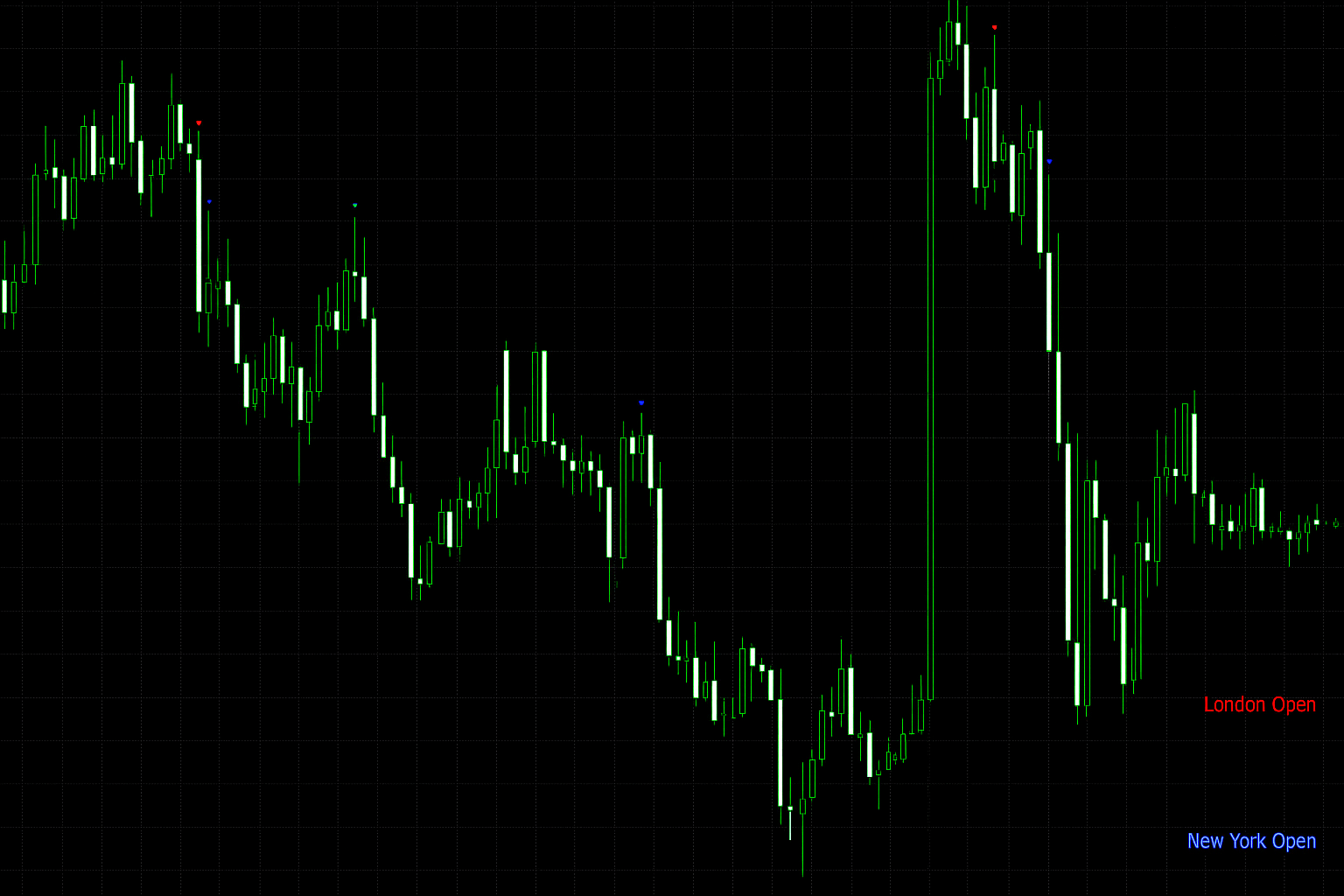
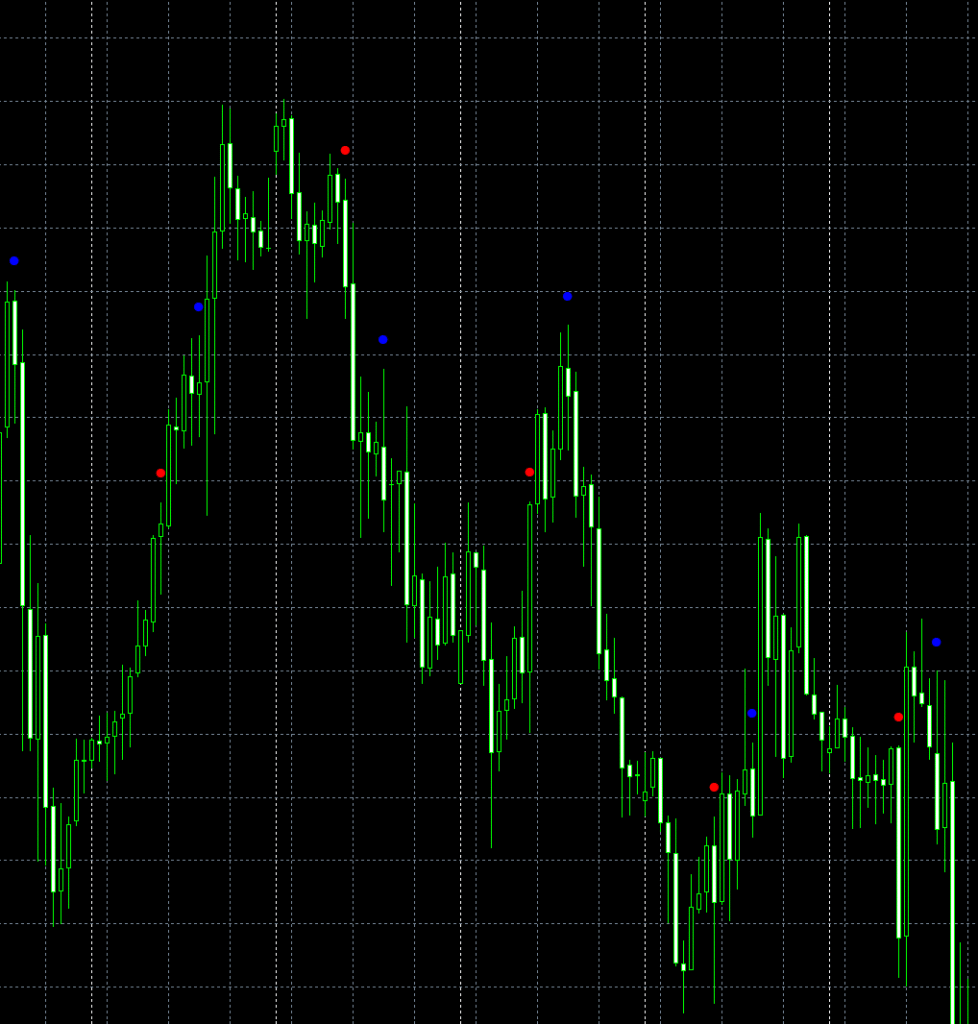
The London Break Indicator for MT4 automatically places colored dots at the exact bar when each trading session begins.
By default:
- Red dots represent London open.
- Blue dots represent New York open.
These markers appear at the top of the candle (using a customizable “dot distance” measured in pips), making them easy to spot without cluttering your chart.
The indicator also adapts to Daylight Saving Time (DST) and GMT offsets, so your session markers align correctly no matter what broker time zone you’re using.
If you want to visualize only a limited number of recent session markers, you can enable the “UseBarCount” feature and specify how many bars to scan (for example, the last 500 candles).
Key Inputs and Customization
This indicator is fully adjustable and works with any instrument or timeframe. Below are the main input parameters explained:
- GMTOffSet – Adjusts session times based on your broker’s GMT offset.
- DST – Turns Daylight Saving adjustment on or off.
- LondonOpenHour / LondonOpenMin – Sets the exact London session start.
- NewYorkOpenHour / NewYorkOpenMin – Defines the New York session start.
- DotDistance – Controls how far above the candle the marker appears.
- UseBarCount – When true, only calculates a specific number of candles (saves CPU).
- BarCount – Defines how many bars to check if the above option is true.
Each of these parameters can be changed to match your personal chart setup. For example, traders on brokers using GMT+3 (common in Europe and Africa) can simply set GMTOffSet = 3 to sync correctly.
How It Works Internally
The London Break Indicator for MT4 loops through historical candles using a simple function called isMarketOpen(). It checks each bar’s hour and minute against the predefined London and New York opening times. When a match is found, it places an arrow marker at the candle’s high price plus a few points of offset to prevent overlap with the candle body.
This logic runs efficiently, ensuring the London Break Indicator for MT4 doesn’t slow down your MetaTrader 4 platform. By adjusting parameters like DotDistance or arrow type, traders can fine-tune how the markers appear visually. Developers can also expand the code by adding Tokyo or Sydney session markers or integrating alert functions that notify you whenever a new forex session begins.
Trading Use Cases
Here are a few practical ways traders use this indicator:
- Session Breakout Strategies:
Many traders look for breakouts that happen within the first 30 minutes after the London open. The dot helps pinpoint that exact time window. - New York Reversals:
Price often reverses or accelerates around the New York open. Having it clearly marked lets you monitor momentum shifts more effectively. - Volatility Filters:
You can use the dots as filters — only trade during high-volume hours, and avoid false signals during quiet Asian or after-hours markets. - Backtesting:
When analyzing past trades, session markers provide immediate visual reference for when key market events occurred, improving your performance review accuracy.
Installation Guide
- Open your MetaTrader 4 platform.
- Click File → Open Data Folder from the top menu.
- Navigate to MQL4 → Indicators.
- Paste the downloaded file: London new york open.mq4 or .ex4.
- Restart MT4 and open the Navigator (Ctrl+N) panel.
- Find the indicator under “Custom Indicators,” then drag it onto any chart.
- Adjust the GMT offset and dot color/distance as desired.

⚠️ Educational Use and Risk Disclaimer
This indicator is provided for educational purposes only. It does not guarantee profits or trading success. All trading involves risk, and results depend on market conditions and individual strategy execution. Always test on a demo account first before applying it to live trading. If you modify or compile the source code, you are fully responsible for the outcome and performance of your version.
FAQ — London & New York Open MT4 Indicator
🕓 Does this indicator automatically detect London and New York session times?
Yes. The indicator uses predefined GMT and DST offsets to mark both London and New York session openings directly on your MT4 chart. You can edit the time inputs if your broker uses a different server timezone.
⚙️ Can I change the dot colors or marker size?
Absolutely. You can edit the indicator_color1 and indicator_color2 parameters in the code or via the MT4 settings window to adjust colors and styles. The DotDistance input controls how far above the candle the marker appears.
📈 Does this work on all forex pairs and timeframes?
Yes. The London & New York Open Indicator is compatible with all symbols — including forex majors, minors, and synthetic indices. It also works across any timeframe since the open times are fixed by clock, not candle duration.
🧩 Does this MT4 indicator include the source code?
Yes. The .mq4 file is included so you can view or modify the code freely. Developers can expand the indicator to include other sessions like Tokyo or Sydney, or even add alerts for when new sessions begin.
💻 Does it work with the latest MetaTrader 4 build?
Yes. The code is written in standard MQL4 and compiles cleanly on all recent MT4 versions. Just paste it into your MQL4 → Indicators folder, refresh, and attach it to your chart.
Download the London Break Indicator for MT4
You can download both the ready-to-use EX4 file and the editable MQ4 source code for free below.